WebSockets 101
This blog covers the fundamentals of WebSockets, why they are needed, and how real time communication works on the web. The goal is to help you get started by understanding WebSockets, their basic implementation, and useful resources to explore further.
December 14, 2025
The Problem WebSockets Solve
Before talking about WebSocket and how they work, the first question we should ask is: why do we even need them?
To answer that, we need to briefly understand how HTTP works (which you probably already know if you’re here).
At a high level, HTTP follows a request-response model:
- The client sends a request
- The server processes it and sends back a response
Once the response is sent, the communication is essentially over.
This is the problem... The client always has to initiate the communication. But what if the server wants to send data to client on its own? It cannot directly push data to the the client. It must wait for the client to ask again. This limitation is exactly where WebSockets come into play.
Common Workaround (Jugaad)
A common workaround you might think of is polling. That is, essentially calling an API after every X seconds or minutes.
1setInterval(() => {
2  fetch("/api/notifications")
3}, 2000);
While this may work, it has clear downsides:
- Unnecessary server load
- Wasted network requests
- Delayed “real time” updates
This approach does not scale well and is inefficient for truly real time applications.
What is a WebSocket?
Now that we understand the problem, let's answer the question: What is a WebSocket?
A WebSocket is a communication protocol that provides a full duplex (two way/bi-directional), persistent connection between a client and a server, allowing for instant, two way data exchange without repeatedly creating new HTTP requests.
In simpler terms:
A WebSocket is a persistent, two way communication channel between a client and a server.
How WebSockets Work
Even with WebSockets, the client still initiates the communication. The difference is how the connection evolves.
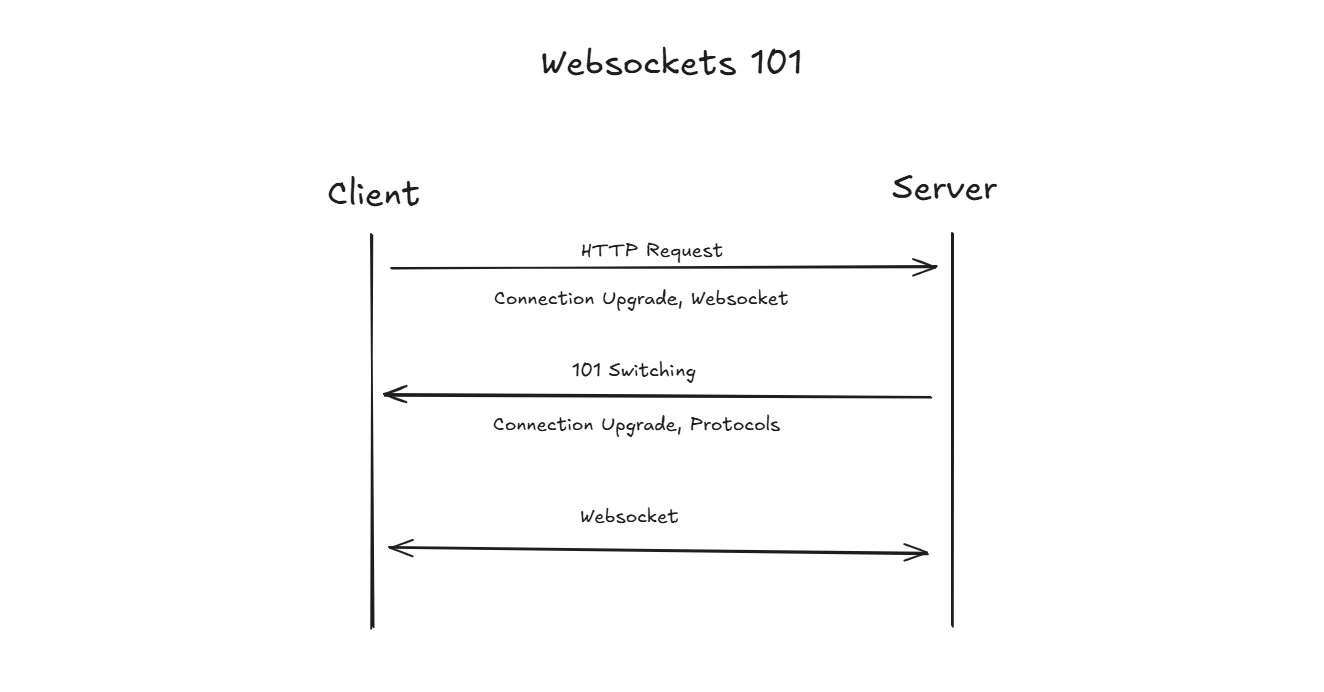
The initial request is a normal HTTP request where the client asks the server to upgrade the connection to WebSockets.
1GET /ws HTTP/1.1
2Host: rafay.sh
3Upgrade: websocket
4Connection: Upgrade
If the server supports WebSockets, it responds with:
1HTTP/1.1 101 Switching Protocols
2Upgrade: websocket
3Connection: Upgrade
The 101 Switching Protocols status means the server agrees to change the communication protocol and from this point onward HTTP is no longer used and connection remains open until either the client or server closes it
Implementation
This is a simple example of an anonymous WebSocket based chat application built using Bun’s native WebSocket server.
Backend
It uses in-memory rooms with no database and demonstrates core concepts such as persistent connections, message broadcasting, and connection lifecycle handling. The implementation is intentionally minimal to focus on how real time communication works using WebSockets.
1import type { Server } from "bun";
2
3interface Room {
4  id: number;
5  connections: {
6    userId: string;
7  }[];
8};
9
10const TOTAL_CONNECTIONS_PER_ROOM = 3;
11let ROOM_ID = 0;
12const rooms: Room[] = [];
13
14function getAvailableRoom() {
15  for (let room of rooms) {
16    if (room.connections.length < TOTAL_CONNECTIONS_PER_ROOM) return room;
17  };
18
19  const newRoom: Room = {
20    id: ROOM_ID++,
21    connections: [],
22  };
23  rooms.push(newRoom);
24
25  return newRoom;
26};
27
28function getUserConnectedRoom(userId: string) {
29  for (let room of rooms) {
30    if (room.connections.find(c => c.userId === userId)) {
31      return room;
32    };
33  };
34};
35
36function broadcastRoomUsers(room: Room, server: Server<{ userId: string; }>) {
37  const payload = {
38    type: "room_users",
39    users: room.connections.map(c => c.userId),
40  };
41
42  server.publish(room.id.toString(), JSON.stringify(payload));
43};
44
45const server = Bun.serve({
46  fetch(req, server) {
47    const url = new URL(req.url);
48
49    if (url.pathname === "/ws") {
50      const userId = url.searchParams.get("userId");
51      if (!userId) return new Response("Missing userId", { status: 400 });
52
53      const success = server.upgrade(req, {
54        data: {
55          userId: userId,
56        },
57      });
58      if (success) return;
59
60      return new Response("Upgrade failed", { status: 500 });
61    };
62  },
63  websocket: {
64    data: {} as { userId: string },
65    open: (ws) => {
66      const room = getAvailableRoom();
67      room.connections.push({
68        userId: ws.data.userId,
69      });
70      ws.subscribe(room.id.toString());
71
72      broadcastRoomUsers(room, server);
73    },
74    message(ws, message) {
75      const room = getUserConnectedRoom(ws.data.userId);
76      if (!room) return;
77
78      const payload = JSON.stringify({
79        type: "chat",
80        userId: ws.data.userId,
81        message: message.toString(),
82        timestamp: Date.now(),
83      });
84
85      // Send message to everyone in the room
86      ws.publish(room?.id.toString(), payload);
87
88      // Send message to the user itself
89      ws.send(payload);
90    },
91    close: (ws, code, message) => {
92      const room = getUserConnectedRoom(ws.data.userId);
93      if (!room) return;
94
95      room.connections = room.connections.filter(c => c.userId !== ws.data.userId);
96
97      broadcastRoomUsers(room, server);
98    },
99  },
100});
101
102console.log(`Listening on ${server.url}`);
Frontend
I used AI to generate the frontend. Since this blog is focused on WebSockets and real time communication, we won’t go into the frontend in detail. However, I’ve included the code here for reference if you want to see how the client connects, sends messages, and handles updates.
1<!-- index.html -->
2
3<!DOCTYPE html>
4<html lang="en">
5<head>
6  <meta charset="UTF-8" />
7  <title>Chat Room</title>
8  <meta name="viewport" content="width=device-width, initial-scale=1.0" />
9
10  <style>
11    body {
12      font-family: system-ui;
13      background: #020617;
14      color: #e5e7eb;
15      display: flex;
16      justify-content: center;
17      align-items: center;
18      height: 100vh;
19      margin: 0;
20    }
21
22    .layout {
23      display: flex;
24      width: 700px;
25      height: 450px;
26      border: 1px solid #1e293b;
27      border-radius: 8px;
28      overflow: hidden;
29    }
30
31    .users {
32      width: 200px;
33      border-right: 1px solid #1e293b;
34      padding: 12px;
35      font-size: 13px;
36    }
37
38    .users h4 {
39      margin: 0 0 10px;
40      font-size: 12px;
41      color: #94a3b8;
42    }
43
44    .user {
45      padding: 6px 8px;
46      border-radius: 4px;
47      background: #020617;
48      margin-bottom: 6px;
49      font-size: 12px;
50      word-break: break-all;
51    }
52
53    .chat {
54      flex: 1;
55      display: flex;
56      flex-direction: column;
57    }
58
59    /* UPDATED HEADER */
60    .header {
61      padding: 12px;
62      border-bottom: 1px solid #1e293b;
63      font-size: 13px;
64      color: #94a3b8;
65      display: flex;
66      justify-content: space-between;
67      align-items: center;
68    }
69
70    .disconnect {
71      background: transparent;
72      border: 1px solid #334155;
73      color: #e5e7eb;
74      padding: 4px 8px;
75      font-size: 12px;
76      border-radius: 4px;
77      cursor: pointer;
78    }
79
80    .disconnect:hover {
81      background: #1e293b;
82    }
83
84    .messages {
85      flex: 1;
86      padding: 12px;
87      overflow-y: auto;
88      font-size: 14px;
89    }
90
91    .message {
92      margin-bottom: 8px;
93      padding: 6px 10px;
94      border-radius: 6px;
95      max-width: 75%;
96    }
97
98    .message.own {
99      background: #2563eb;
100      margin-left: auto;
101      color: white;
102    }
103
104    .message.other {
105      background: #020617;
106      border: 1px solid #1e293b;
107    }
108
109    .input {
110      display: flex;
111      border-top: 1px solid #1e293b;
112    }
113
114    input {
115      flex: 1;
116      padding: 10px;
117      border: none;
118      outline: none;
119      background: #020617;
120      color: white;
121    }
122
123    button {
124      padding: 10px 16px;
125      border: none;
126      background: #2563eb;
127      color: white;
128      cursor: pointer;
129    }
130  </style>
131</head>
132<body>
133
134  <div class="layout">
135    <div class="users">
136      <h4>Connected Users</h4>
137      <div id="users"></div>
138    </div>
139
140    <div class="chat">
141      <!-- UPDATED HEADER -->
142      <div class="header">
143        <span id="headerText"></span>
144        <button class="disconnect" id="disconnect">Disconnect</button>
145      </div>
146
147      <div class="messages" id="messages"></div>
148
149      <div class="input">
150        <input id="input" placeholder="Type message..." />
151        <button id="send">Send</button>
152      </div>
153    </div>
154  </div>
155
156  <script>
157    const userId = sessionStorage.getItem("userId");
158
159    if (!userId) {
160      window.location.href = "index.html";
161    }
162
163    const headerText = document.getElementById("headerText");
164    headerText.textContent = `Connected as ${userId}`;
165
166    const ws = new WebSocket(
167      `ws://localhost:3000/ws?userId=${userId}`
168    );
169
170    const messagesEl = document.getElementById("messages");
171    const usersEl = document.getElementById("users");
172    const inputEl = document.getElementById("input");
173    const sendBtn = document.getElementById("send");
174    const disconnectBtn = document.getElementById("disconnect");
175
176    ws.addEventListener("message", (e) => {
177      const data = JSON.parse(e.data);
178
179      if (data.type === "chat") {
180        renderMessage(
181          data.message,
182          data.userId === userId
183        );
184      }
185
186      if (data.type === "room_users") {
187        renderUsers(data.users);
188      }
189    });
190
191    ws.addEventListener("close", () => {
192      headerText.textContent = "Disconnected";
193
194      inputEl.disabled = true;
195      sendBtn.disabled = true;
196
197      setTimeout(() => {
198        sessionStorage.removeItem("userId");
199        window.location.href = "index.html";
200      }, 500);
201    });
202
203    disconnectBtn.addEventListener("click", () => {
204      if (ws.readyState === WebSocket.OPEN) {
205        ws.close();
206      }
207    });
208
209    sendBtn.addEventListener("click", send);
210    inputEl.addEventListener("keydown", e => {
211      if (e.key === "Enter") send();
212    });
213
214    function renderMessage(text, isOwn) {
215      const div = document.createElement("div");
216      div.className = `message ${isOwn ? "own" : "other"}`;
217      div.textContent = text;
218
219      messagesEl.appendChild(div);
220      messagesEl.scrollTop = messagesEl.scrollHeight;
221    }
222
223    function renderUsers(userList) {
224      usersEl.innerHTML = "";
225
226      userList.forEach(id => {
227        const div = document.createElement("div");
228        div.className = "user";
229        div.textContent = id;
230        usersEl.appendChild(div);
231      });
232    }
233
234    function send() {
235      const value = inputEl.value.trim();
236      if (!value || ws.readyState !== WebSocket.OPEN) return;
237
238      ws.send(value);
239      inputEl.value = "";
240    }
241  </script>
242
243</body>
244</html>1<!-- chat.html -->
2
3<!DOCTYPE html>
4<html lang="en">
5<head>
6 <meta charset="UTF-8" />
7 <title>Chat Room</title>
8 <meta name="viewport" content="width=device-width, initial-scale=1.0" />
9
10 <style>
11 body {
12 font-family: system-ui;
13 background: #020617;
14 color: #e5e7eb;
15 display: flex;
16 justify-content: center;
17 align-items: center;
18 height: 100vh;
19 margin: 0;
20 }
21
22 .layout {
23 display: flex;
24 width: 700px;
25 height: 450px;
26 border: 1px solid #1e293b;
27 border-radius: 8px;
28 overflow: hidden;
29 }
30
31 .users {
32 width: 200px;
33 border-right: 1px solid #1e293b;
34 padding: 12px;
35 font-size: 13px;
36 }
37
38 .users h4 {
39 margin: 0 0 10px;
40 font-size: 12px;
41 color: #94a3b8;
42 }
43
44 .user {
45 padding: 6px 8px;
46 border-radius: 4px;
47 background: #020617;
48 margin-bottom: 6px;
49 font-size: 12px;
50 word-break: break-all;
51 }
52
53 .chat {
54 flex: 1;
55 display: flex;
56 flex-direction: column;
57 }
58
59 /* UPDATED HEADER */
60 .header {
61 padding: 12px;
62 border-bottom: 1px solid #1e293b;
63 font-size: 13px;
64 color: #94a3b8;
65 display: flex;
66 justify-content: space-between;
67 align-items: center;
68 }
69
70 .disconnect {
71 background: transparent;
72 border: 1px solid #334155;
73 color: #e5e7eb;
74 padding: 4px 8px;
75 font-size: 12px;
76 border-radius: 4px;
77 cursor: pointer;
78 }
79
80 .disconnect:hover {
81 background: #1e293b;
82 }
83
84 .messages {
85 flex: 1;
86 padding: 12px;
87 overflow-y: auto;
88 font-size: 14px;
89 }
90
91 .message {
92 margin-bottom: 8px;
93 padding: 6px 10px;
94 border-radius: 6px;
95 max-width: 75%;
96 }
97
98 .message.own {
99 background: #2563eb;
100 margin-left: auto;
101 color: white;
102 }
103
104 .message.other {
105 background: #020617;
106 border: 1px solid #1e293b;
107 }
108
109 .input {
110 display: flex;
111 border-top: 1px solid #1e293b;
112 }
113
114 input {
115 flex: 1;
116 padding: 10px;
117 border: none;
118 outline: none;
119 background: #020617;
120 color: white;
121 }
122
123 button {
124 padding: 10px 16px;
125 border: none;
126 background: #2563eb;
127 color: white;
128 cursor: pointer;
129 }
130 </style>
131</head>
132<body>
133
134 <div class="layout">
135 <div class="users">
136 <h4>Connected Users</h4>
137 <div id="users"></div>
138 </div>
139
140 <div class="chat">
141 <!-- UPDATED HEADER -->
142 <div class="header">
143 <span id="headerText"></span>
144 <button class="disconnect" id="disconnect">Disconnect</button>
145 </div>
146
147 <div class="messages" id="messages"></div>
148
149 <div class="input">
150 <input id="input" placeholder="Type message..." />
151 <button id="send">Send</button>
152 </div>
153 </div>
154 </div>
155
156 <script>
157 const userId = sessionStorage.getItem("userId");
158
159 if (!userId) {
160 window.location.href = "index.html";
161 }
162
163 const headerText = document.getElementById("headerText");
164 headerText.textContent = `Connected as ${userId}`;
165
166 const ws = new WebSocket(
167 `ws://localhost:3000/ws?userId=${userId}`
168 );
169
170 const messagesEl = document.getElementById("messages");
171 const usersEl = document.getElementById("users");
172 const inputEl = document.getElementById("input");
173 const sendBtn = document.getElementById("send");
174 const disconnectBtn = document.getElementById("disconnect");
175
176 ws.addEventListener("message", (e) => {
177 const data = JSON.parse(e.data);
178
179 if (data.type === "chat") {
180 renderMessage(
181 data.message,
182 data.userId === userId
183 );
184 }
185
186 if (data.type === "room_users") {
187 renderUsers(data.users);
188 }
189 });
190
191 ws.addEventListener("close", () => {
192 headerText.textContent = "Disconnected";
193
194 inputEl.disabled = true;
195 sendBtn.disabled = true;
196
197 setTimeout(() => {
198 sessionStorage.removeItem("userId");
199 window.location.href = "index.html";
200 }, 500);
201 });
202
203 disconnectBtn.addEventListener("click", () => {
204 if (ws.readyState === WebSocket.OPEN) {
205 ws.close();
206 }
207 });
208
209 sendBtn.addEventListener("click", send);
210 inputEl.addEventListener("keydown", e => {
211 if (e.key === "Enter") send();
212 });
213
214 function renderMessage(text, isOwn) {
215 const div = document.createElement("div");
216 div.className = `message ${isOwn ? "own" : "other"}`;
217 div.textContent = text;
218
219 messagesEl.appendChild(div);
220 messagesEl.scrollTop = messagesEl.scrollHeight;
221 }
222
223 function renderUsers(userList) {
224 usersEl.innerHTML = "";
225
226 userList.forEach(id => {
227 const div = document.createElement("div");
228 div.className = "user";
229 div.textContent = id;
230 usersEl.appendChild(div);
231 });
232 }
233
234 function send() {
235 const value = inputEl.value.trim();
236 if (!value || ws.readyState !== WebSocket.OPEN) return;
237
238 ws.send(value);
239 inputEl.value = "";
240 }
241 </script>
242
243</body>
244</html>
245